How to Choose Cable Drop Fibra Optica?

How to Choose Cable Drop Fibra Optica?

Choosing Cable Drop Fibra Optica is less about picking the thickest cable and more about matching the cable to its route. A span across a garden faces different stresses from a short run along an indoor wall. Pole spacing, wind exposure, sunlight, moisture, and the building entry point all matter. Small details matter.

As an editorial illustration, fiber-access engineer Alex Morgan might put it this way: “A good drop cable fits the path, the load, and the conditions at the entry point.” This is an illustrative line, not a verified quotation from a named industry source. The principle remains practical: check the manufacturer’s datasheet before comparing products. Look for the supported installation method, tensile strength, allowable bend radius, temperature range, and whether the cable is rated for indoor, outdoor, or mixed use.

This guide will help you compare common drop-cable constructions, including flat, round, and self-supporting designs. It will also explain when reinforcement, armor, or a particular fiber count may be useful. A cable that handles one route well may be awkward on another. That trade-off is easy to miss. Confirm connector compatibility and termination plans, too, since a suitable cable can still create problems at the endpoint. When specifications are unclear, ask the supplier for documentation rather than relying on appearance or a broad product label. Your installation details may change the choice. That is worth reconsidering before purchase.
How to Choose Cable Drop Fibra Optica?

Assess the Installation Environment and Cable Route

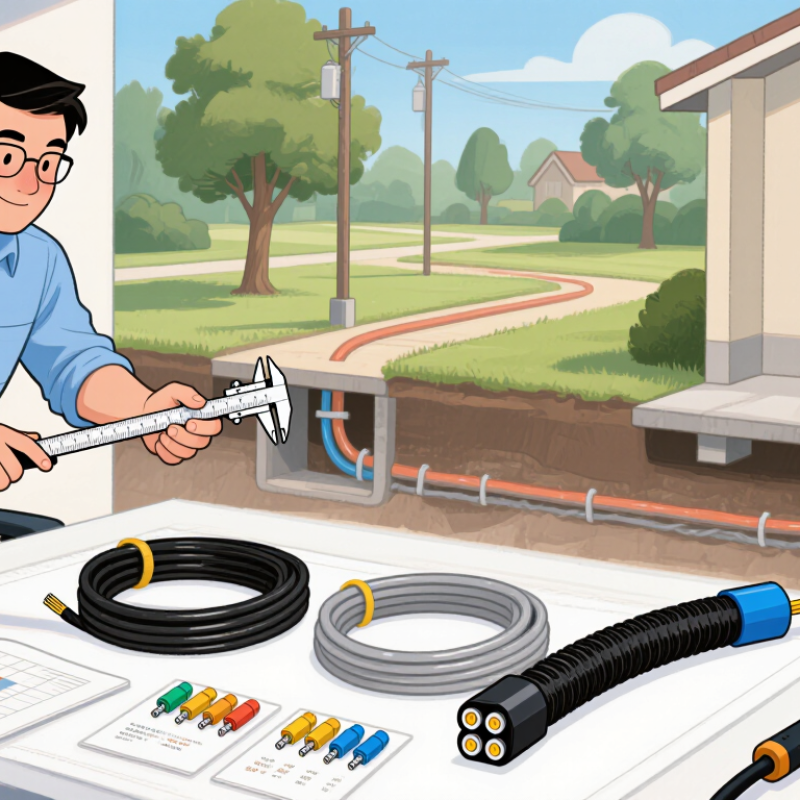
A drop-fiber cable should match the conditions along its entire route, not just the final connection point. Check whether the path runs indoors, outdoors, through a wall, or inside a duct. Note direct sunlight, rain exposure, temperature changes, damp spaces, and possible contact with sharp metal edges. For outdoor sections, confirm that the cable’s specifications suit the exposure. Do not assume an indoor-rated cable will perform well outside. Check its minimum bend radius and pulling limits before installation; tight corners can damage the fiber even when the jacket looks intact. Small details matter.

Walk the proposed route and compare it with the building plan. Plans can miss a low beam, a locked service area, or a newly installed pipe. Measure the path, mark entry and exit points, and identify safe places for supports and service loops. Keep the cable clear of hot surfaces, moving equipment, and sources of abrasion. Avoid unnecessary crossings with electrical services, and follow applicable separation guidance. Measure twice. The shortest route is not always the best one; a slightly longer path may offer better protection and easier access for future repairs. If the route changes on site, pause and reassess the bend, support, and exposure conditions before proceeding.

How to Choose a Fiber Optic Drop Cable: Assess the Installation Environment and Cable Route

Plan the route to avoid tight bends, sharp edges, crushing, and excessive pulling tension. Typical guidance is a minimum bend radius of 10× the cable outside diameter after installation and 20× during pulling. Requirements vary by cable construction, so check the cable datasheet and account for temperature, moisture, and other site conditions.

Determine Fiber Type and Required Core Count

For most residential FTTH drops, single-mode fiber is the practical choice. Specify a fiber type that matches the network design, such as ITU-T G.657.A2 for routes with tight bends around door frames or small wall boxes. Its bend tolerance helps reduce installation-related signal loss, and the A category is designed for compatibility with G.652.D networks. Check connector type and optical requirements too; the cable specification alone does not guarantee a working link.

Core count depends on the architecture, not just expected internet speed. A typical PON drop carries two-way traffic on one strand, so one core may serve a home. Point-to-point links may need two cores, unless compatible single-fiber equipment is planned. Two or four cores can provide a spare or support future services, but extra fibers add cost and may go unused.

Cisco’s Annual Internet Report (2018–2023) projected 5.3 billion internet users by 2023, or 66% of the global population; this signals broad demand growth, not a required core count for each drop.

One caveat: local expansion plans are often uncertain. Confirm the topology, spare-fiber policy, route length, and bend conditions with the network designer before ordering.

Choose a Cable Design for Indoor or Outdoor Use

How to Choose Cable Drop Fibra Optica?
Choose a Cable Design for Indoor or Outdoor Use

Start with the route, not the price. An indoor drop may pass through a hallway, ceiling space, or wall cavity, where jacket fire performance and bend radius matter. Match the cable to the building’s required riser or plenum rating, and confirm local specifications before ordering. Tight corners can add signal loss, even when the connector looks clean. Small detail. The Fiber Broadband Association’s 2024 deployment report counted about 76.5 million U.S. homes passed by fiber at year-end 2023. That figure does not prescribe a cable type, but it underscores the scale of access-network buildouts and the value of route-specific planning.

For outdoor runs, choose a construction suited to sunlight, water, temperature swings, and the installation method. Aerial drops need appropriate support; duct or buried routes may require water-blocking and crush protection. Check the specified minimum bend radius and tensile limits, then inspect the entry point where outdoor cable transitions indoors. That transition is easy to overlook. Hybrid indoor/outdoor cable can simplify the path, but verify its indoor fire rating and termination instructions. Sketch the actual route before buying. Drawings can miss a sharp turn, and real walls rarely cooperate.

How to Choose Cable Drop Fibra Optica? - Choose a Cable Design for Indoor or Outdoor Use

Compare the installation environment first. Cable construction, fiber type, fire rating, and bend limits vary by product and local requirements; confirm them in the cable datasheet and applicable codes before installation.

Selection Factor Indoor Drop Cable Outdoor Aerial Drop Cable Outdoor Direct-Burial Drop Cable Duct or Conduit Drop Cable Indoor/Outdoor-Rated Drop Cable
Typical installation Inside a building, such as from a building entrance to a communications room or subscriber outlet. Suspended between a distribution point and a building, using a support wire or self-supporting construction as specified. Buried directly in soil where the cable is designed and approved for that method. Pulled through an underground or indoor duct or conduit that provides a physical pathway. Runs that pass from an outdoor area into a building, where one cable is intended to serve both environments.
Jacket and environmental protection Typically uses a flame-rated indoor jacket. Outdoor UV and moisture protection may not be provided. Typically uses a UV-resistant, weather-resistant jacket; some designs include water-blocking materials. Typically includes a moisture-resistant construction and may include armor or other rodent protection. Needs a jacket suitable for the duct environment; water-blocking features may be useful where water can enter the pathway. Uses a jacket designed for the stated indoor and outdoor conditions, including the required fire-performance rating indoors.
Support and tensile loading Usually supported by building pathways, clips, or trays. Do not use the optical cable as a structural support. Must be rated for the span, sag, wind, and installation tension. Use the specified messenger or self-supporting design. Burial depth, backfill, and mechanical protection should follow local requirements and the cable instructions. Pulling tension and sidewall pressure must stay within the cable manufacturer's limits. Check both outdoor pulling or support requirements and indoor routing requirements for the complete cable route.
Fire and building-code considerations Choose the applicable indoor rating, such as riser or plenum where required by the building pathway and local code. Outdoor-rated construction alone may not meet indoor fire requirements. Check what is required at the building entrance. Outdoor-rated construction alone may not meet indoor fire requirements. Check what is required at the building entrance. Determine whether the duct is indoors, outdoors, or passes through a fire-rated space; select the required rating. Verify the specific listing and permitted use for both outdoor exposure and the indoor spaces the cable enters.
Fiber and bend selection Single-mode fiber is common for access links. Bend-insensitive fiber can help in tight indoor routing when compatible with the system. Single-mode fiber is common for access links. Check the minimum bend radius during installation and after installation. Single-mode fiber is common for access links. Select fiber and construction to suit route length, handling, and splice requirements. Choose fiber compatible with the optical link budget and ensure the cable can be pulled without exceeding its bend limits. Confirm that the fiber type, connectors, and splice components are compatible throughout the full link.
Main advantages Designed for building interiors and can be easier to route and terminate in indoor pathways. Designed for exposed spans and outdoor weather when installed within its specified limits. Designed to withstand underground conditions when the cable and installation method are correctly matched. The pathway can protect the cable and may make replacement or upgrades easier if the duct is suitable. Can reduce the need for a cable transition at the building entrance when its ratings cover the entire route.
Common limitations May be unsuitable for prolonged outdoor exposure, direct burial, or aerial spans. Requires suitable attachment points and careful span design; an indoor transition may still be needed. More demanding installation and repair conditions; not every outdoor cable is approved for direct burial. Conduit capacity, bends, water, and pulling distance can limit installation; the duct does not remove cable tension limits. May cost more than a cable designed for a single environment; “indoor/outdoor” does not automatically mean plenum-rated.
Best fit Choose for routes entirely inside a building when its fire rating matches the pathway. Choose for exposed building-to-building or pole-to-building spans when the cable is rated for the span and weather. Choose only when the route requires burial and the cable is specifically rated for direct burial. Choose when a suitable conduit or duct is available and the cable is rated for pulling through it. Choose for a continuous outdoor-to-indoor route only after confirming all required environmental and fire ratings.
Before ordering Confirm fiber type and count, connector or splice plan, cable diameter, pathway capacity, jacket rating, operating environment, minimum bend radius, maximum pulling tension, and applicable local code. Treat cable dimensions and performance limits as product-specific rather than universal.

Match Connectors and Cable Features to Network Equipment

Choosing a cable drop fibra óptica starts at the equipment ports. Check whether the ONT, terminal, or patch panel requires SC/APC or SC/UPC connectors. Match the connector polish exactly; mating APC and UPC can increase loss. Confirm the fiber type and supported wavelengths against the transceiver or access-system specification. For PON equipment, the upstream and downstream wavelengths differ, so a cable alone cannot fix an incompatible optic.

Route and environment matter just as much. For tight indoor turns, ITU-T G.657.A2 fiber supports a minimum bend radius of 7.5 mm under specified conditions. Still, follow the cable maker’s handling limits; a sharp kink can cause trouble. Choose a jacket suited to the path, such as UV-resistant construction outdoors or an indoor-rated jacket inside buildings. Verify the connector endface is clean, then test insertion loss after installation.

Small details count. The ITU’s Facts and Figures 2023 estimated that 5.4 billion people, about 67% of the world’s population, used the internet. That growth makes dependable access links important, but compatibility remains site-specific. Record the port type, wavelength, fiber grade, route, and measured loss before ordering. I still check labels twice; field records can be incomplete.

Check Durability, Standards, and Installation Requirements

A cable drop fibra optica must suit the route, not just the advertised speed. Check its outer jacket for UV exposure, moisture, abrasion, and temperature limits. For an aerial span, verify the cable’s support design and rated tensile load. For a duct or buried route, confirm that its construction matches the installation conditions. A low price means little if the jacket cracks after one harsh season.

Read the datasheet and request test documentation for relevant mechanical and environmental performance. IEC 60794 covers optical-fiber cable requirements, but the applicable parts depend on cable type and region. Local project specifications may add further requirements. Do not assume that a familiar standard name proves suitability; check the exact cable construction and documented test results. Small details matter.

Plan installation around the specified bend radius and pulling tension. Tight corners, sharp edges, and over-tightened clips can damage fibers even when the jacket looks intact. Leave sensible slack at entry points, secure the cable without crushing it, and keep it clear of heat sources. I would rather accept a slightly less tidy route than force a tight bend. After installation, inspect the route and test optical performance against the project’s acceptance criteria. A simple visual check is not enough.